Tag Archives: java program

Java program to check whether given number is a multiple of 3 or not

Given an integer n, check whether it is a multiple of 3 or not. If the number is divisible by 3, then return true else return false.

Constraints

1 <= n <= 10000

import java.io.*;
import java.util.*;
import java.math.*;
public class CandidateCode {
  public static boolean threeByThree(int input1){
 if(input1%3==0)
 return true;
 return false;
 }
 public static void main(String[] args) throws IOException{
 Scanner in = new Scanner(System.in);
 boolean output;
 int ip1 = Integer.parseInt(in.nextLine().trim());
 output = threeByThree(ip1);
 System.out.println(String.valueOf(output ? 1 : 0));
 }
}

Java program to check whether it is a multiple of 7 or not

Given an integer n, check whether it is a multiple of 7 or not. If the number is divisible by 7, then return true else return false.

Constraints

1 <= n <= 1000

Sample TestCase
Input
27
Output
0
import java.io.*;
import java.util.*;
import java.text.*;
import java.math.*;
import java.util.regex.*;
public class MultipleOfSeven {
 public static boolean sevenBySeven(int num){
    if(num%7==0){
        return true;
     }else{
       return false;
 }
 public static void main(String[] args) throws IOException{
 Scanner in = new Scanner(System.in);
 boolean output;
 int ip1 = Integer.parseInt(in.nextLine().trim());
 output = sevenBySeven(ip1);
 System.out.println(String.valueOf(output ? 1 : 0));
 }
}

Java program for a given number n, finds a number p which is greater than or equal to n and is a power of 2.

Java Program for Replacing White Space Characters

Learn Android Programming – For Beginners To Pro

Java program for a given number n, finds a number p which is greater than or equal to n and is a power of 2.

Java program for a given number n, finds a number p which is greater than or equal to n and is a power of 2.

Constraints

1 <= n <= 10000

Sample TestCase
Input
5
Output
8
import java.util.*;
import java.math.*;
public class NextPowerOfTwo {
public static int twoPowers(int num){
    while(num>0){
        if(Math.ceil(log(num,2))==Math.floor(log(num,2))){
            break;
           }
       num++;
      }
      return num;
    }
static double log(int x, int base){
    return (Math.log(x) / Math.log(base));
    }
public static void main(String[] args) throws IOException{
 Scanner in = new Scanner(System.in);
 int output = 0;
 int input = Integer.parseInt(in.nextLine().trim());
 output = twoPowers(input);
 System.out.println(String.valueOf(output));
 }
}

Java Program for Replacing White Space Characters
Creating an App Icon with the Asset Studio
Numbers in JavaScript

While and Do-While loop in Java with example

In this tutorial we will discuss while loop and do while loop.

Java while Loop

A while loop statement in Java programming language repeatedly executes a target statement as long as a given condition is true.

The syntax of while loop is:

while (Expression) {
    // codes inside body of while loop
}

How while loop works?

The expression inside parenthesis is a boolean expression. If the test expression is evaluated to true,statements inside the while loop are executed. then, the test expression is evaluated again. This process goes on until the test expression is evaluated to false. If the test expression is evaluated to false, while loop is terminated.

Flowchart of while Loop

Capture

Example: while Loop

// Program to print Hello 10 times

class WhileLoop {
   public static void main(String[] args) {
      
      int i = 0;
	   
      while (i < 10) {
         System.out.println("Hello " + i);
         ++i;
      }
   }
}

The output will be:
Hello 0
Hello 1
Hello 2
Hello 3
Hello 4
Hello 5
Hello 6
Hello 7
Hello 8
Hello 9

Java do-while Loop

The do-while loop is similar to while loop with one key difference. The body of do-while loop is executed for once before the test expression is checked.

The major difference between While and do While is that statement will be executed at least once in do while.

The syntax of do-while loop is:

do {
   // statements
} while (expression);

How do-while loop works?

The body of do-while loop is executed once (before checking the test expression). Only then, the test expression is checked. If the test expression is evaluated to true, codes inside the body of the loop are executed, and the test expression is evaluated again. This process goes on until the test expression is evaluated to false. When the test expression is false, the do-while loop terminates.

Flowchart of do-while Loop

Capture

Example: do-while Loop:

class DoWhileLoopDemo {
    public static void main(String args[]){
         int i=5;
         do{
              System.out.println(i);
              i--;
         }while(i>0);
    }
}
output:
5
4
3
2
1

Example: Iterating array using do-while loop

class DoWhileArr{
    public static void main(String args[]){
         int arr[]={21,17,45,90};
         //in java array index start with 0
         int i=0;
         do{
              System.out.println(arr[i]);
              i++;
         }while(i<4);
    }
}

Output:
21
17
45
90

Infinite while and do-while loop

If the test expression never evaluates to false, the body of while and do..while loop is executed infinite number of times.For example,

while (true) {
   // body of while loop
}

Example of infinite while and do-while loop

int i = 10;
while (i == 10) {
   System.out.print("HelloTech!");
}
output:
HelloTech!
HelloTech!
HelloTech!
ctrl+c

The infinite do-while loop works in similar way like while loop.

int i = 10;


do {


System.out.print("HelloTech!");

}(i == 10);

output:
HelloTech!
HelloTech!
HelloTech!
ctrl+c

You need to press ctrl+c to exit from the program.

Weird Numbers

Given an integer as input, can you check the following:

  • If   N is odd then print “Weird”
  • If N is even and, in between range 2 and 5(inclusive), print “Not Weird”
  • If   N is even and, in between range 6 and 20(inclusive), print “Weird”
  • If is even and ,N>20  print “Not Weird”

Java solution for this problem is given below:


import java.util.*;

public class Solution {

    public static void main(String[] args) {
        Scanner sc=new Scanner(System.in);
        int n=sc.nextInt();
        if(n%2 !=0){
            System.out.println("Weird");
        }
        else if((n>=2 &&n<=5)&& n%2==0){
            System.out.println("Not Weird");
        }
        else if(n>=6 && n<=20 && n%2==0){
            System.out.println("Weird");
        }else{
            System.out.println("Not Weird");
        }
    }
}


Java program to find month using switch statement

import java.io.BufferedReader;
import java.io.InputStreamReader;

public class MonthFinder {
    public static void main(String[] args) {
        InputStreamReader isr = new InputStreamReader(System.in);
        BufferedReader br = new BufferedReader(isr);
        try {
            System.out.println("Enter a numeric month:");
            String input = br.readLine();
            int month = Integer.parseInt(input);
            String strMonth;
            switch (month) {
                case 1:
                    strMonth = "January";
                    break;
                case 2:
                    strMonth = "February";
                    break;
                case 3:
                    strMonth = "March";
                    break;
                case 4:
                    strMonth = "April";
                    break;
                case 5:
                    strMonth = "May";
                    break;
                case 6:
                    strMonth = "June";
                    break;
                case 7:
                    strMonth = "July";
                    break;
                case 8:
                    strMonth = "August";
                    break;
                case 9:
                    strMonth = "September";
                    break;
                case 10:
                    strMonth = "October";
                    break;
                case 11:
                    strMonth = "November";
                    break;
                case 12:
                    strMonth = "December";
                    break;
                default:
                    strMonth = "Invalid Month";
            }
            System.out.println("Month " + month + " is:" + strMonth);

        } catch (Exception e) {
            System.out.println(e.getMessage());
            e.printStackTrace();
        }
    }
}

Java program to find grade


import java.io.BufferedReader;
import java.io.InputStreamReader;

public class Grade {
    public static void main(String[] args) {
        InputStreamReader isr = new InputStreamReader(System.in);
        BufferedReader br = new BufferedReader(isr);
        try {
            System.out.println("Enter a valid score:");
            String input = br.readLine();
            int score = Integer.parseInt(input);
            String grade = "";
           /* if (score >= 90) {
                grade = "A+";
            } else if (score >= 80 && score < 90) {
                grade = "A";
            } else if (score >= 70 && score < 80) {
                grade = "A-";
            } else if (score >= 60 && score < 70) {
                grade = "B+";
            } else if (score >= 50 && score < 60) {
                grade = "B";
            } else if (score >= 40 && score < 50) {
                grade = "B-";
            } else {
                grade = "F";
            }*/

            if (score >= 90) {
                grade = "A+";
            } else if (score >= 80) {
                grade = "A";
            } else if (score >= 70) {
                grade = "A-";
            } else if (score >= 60) {
                grade = "B+";
            } else if (score >= 50) {
                grade = "B";
            } else if (score >= 40) {
                grade = "B-";
            } else {
                grade = "F";
            }
            System.out.println("score:" + score + " grade:" + grade);
        } catch (Exception e) {
            System.out.println(e.getMessage());
            e.printStackTrace();
        }
    }
}

Java program to calculate area of a triangle(Hero’s formula)

This is a Java Program to Find the Area of a Triangle Given Three Sides.Enter the length of three sides of triangle. Now we use the Heron’s formula to get the area of triangle.

In geometry, Heron’s formula also called Hero’s formula),  gives the area of a triangle by requiring no arbitrary choice of side as base or vertex as origin, contrary to other formulas for the area of a triangle, such as half the base times the height or half the norm of a cross product of two sides.

A = \sqrt{s(s-a)(s-b)(s-c)},

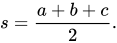
where s is the semiperimeter of the triangle; that is,

  s=\frac{a+b+c}{2}.
import java.io.BufferedReader;
import java.io.InputStreamReader;
import java.text.DecimalFormat;

public class CalcTriangleArea {
    public static void main(String[] args) {
        InputStreamReader isr = new InputStreamReader(System.in);
        BufferedReader br = new BufferedReader(isr);
        try {
            System.out.println("Enter side1:");
            String input = br.readLine();
            double a = Double.parseDouble(input);
            System.out.println("Enter side2:");
            input = br.readLine();
            double b = Double.parseDouble(input);
            System.out.println("Enter side3:");
            input = br.readLine();
            double c = Double.parseDouble(input);
            DecimalFormat df = new DecimalFormat("0.00");
            System.out.println("You Entered:" + a + " " + b + " " + c);
            if ((a + b) > c && (b + c) > a && (a + c) > b) {
                double s = (a + b + c) / 2;
                double area = Math.sqrt((s * (s - a) * (s - b) * (s - c)));
                System.out.println("Area:" + df.format(area));
            } else {
                System.out.println("Can't form a triangle with the gives side..");
            }

        } catch (Exception e) {
            System.out.println(e.getMessage());
            e.printStackTrace();
        }
    }
}

Java program to find the smallest number of the three number

import java.io.BufferedReader;
import java.io.InputStreamReader;

public class FindSmallest {
    public static void main(String[] args) {
        System.out.println("This program will find the smallest number of the three number");
        InputStreamReader isr = new InputStreamReader(System.in);
        BufferedReader br = new BufferedReader(isr);
        try {
            System.out.println("Enter number1:");
            String input = br.readLine();
            int num1 = Integer.parseInt(input);
            System.out.println("Enter number2:");
            input = br.readLine();
            int num2 = Integer.parseInt(input);
            System.out.println("Enter number3:");
            input = br.readLine();
            int num3 = Integer.parseInt(input);
            int smallest = num1;
            if (num2 < smallest) {
                smallest = num2;
            }
            if (num3 < smallest) {
                smallest = num3;
            }
            System.out.println("Number Entered:" + num1 + " " + num2 + " " + num3);
            System.out.println("Smallest number:" + smallest);


        } catch (Exception e) {
            System.out.println(e.getMessage());
            e.printStackTrace();
        }

    }
}


Java program to find the largest of the three numbers

import java.io.BufferedReader;
import java.io.InputStreamReader;

//java program to find the largest number among three number
public class FindLargest {
    public static void main(String[] args) {
        System.out.println("This program will find the largest number of the three number");
        InputStreamReader isr = new InputStreamReader(System.in);
        BufferedReader br = new BufferedReader(isr);
        try {
            System.out.println("Enter number1:");
            String input = br.readLine();
            int num1 = Integer.parseInt(input);
            System.out.println("Enter number2:");
            input = br.readLine();
            int num2 = Integer.parseInt(input);
            System.out.println("Enter number3:");
            input = br.readLine();
            int num3 = Integer.parseInt(input);
            int largest = num1;
            if (num2 > largest) {
                largest = num2;
            }
            if (num3 > largest) {
                largest = num3;
            }
            System.out.println("Number Entered:" + num1 + " " + num2 + " " + num3);
            System.out.println("Largest number:" + largest);


        } catch (Exception e) {
            System.out.println(e.getMessage());
            e.printStackTrace();
        }

    }
}